


revidapi.com cam kết.
Freeship đơn 500k
Freeship đơn hàng 500k
Ship toàn quốc
Ship hàng toàn quốc
Hoàn tiền
Hoàn tiền 100% nếu không hài lòng
Kiểm hàng COD
Nhận hàng, kiểm hàng rồi mới thanh toán
Tư vấn miễn phí
Hỗ trợ tư vấn miễn phí
Giá công khai
Giá công khai, không thêm phí

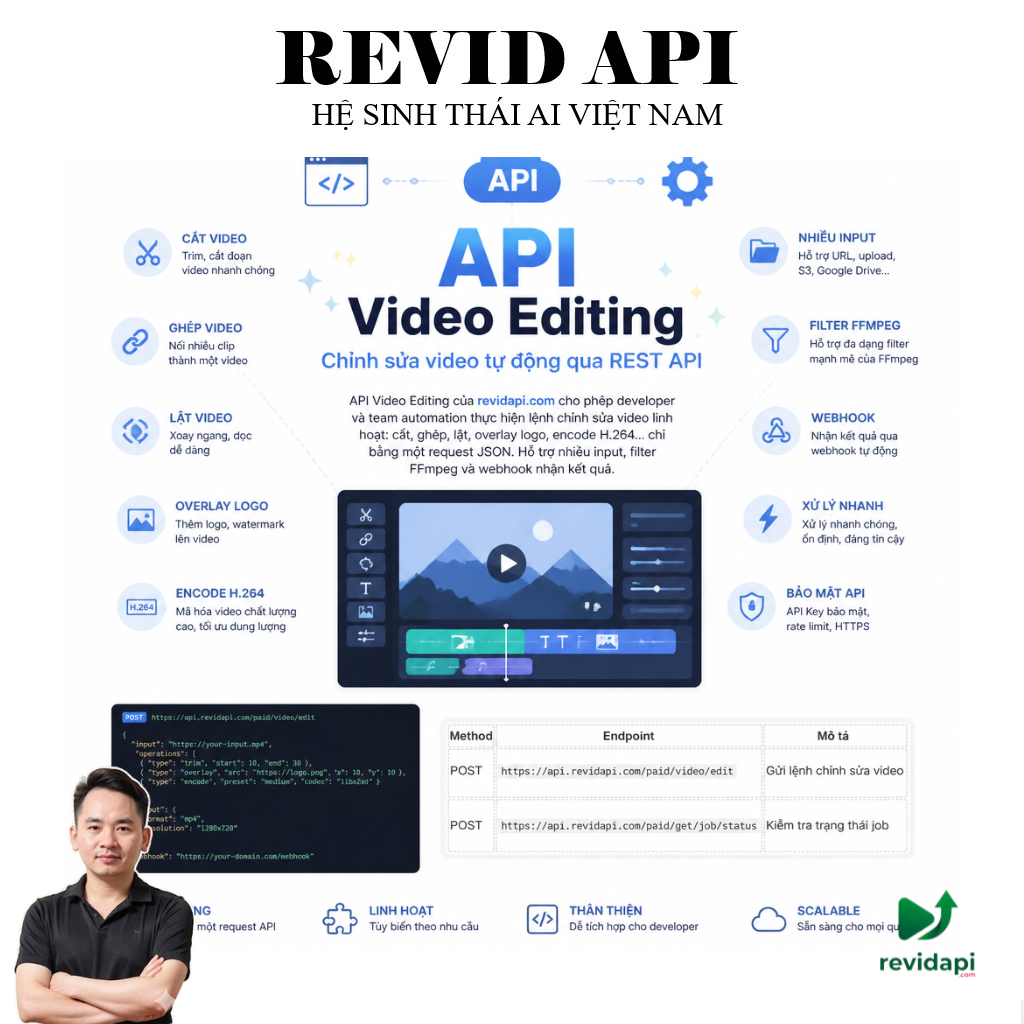
API Video Editing — Chỉnh sửa video tự động qua REST API

API Video Editing của revidapi.com cho phép developer và team automation thực hiện lệnh chỉnh sửa video linh hoạt: cắt, ghép, lật, overlay logo, encode H.264… chỉ bằng một request JSON. Hỗ trợ nhiều input, filter FFmpeg và webhook nhận kết quả.

Phù hợp workflow n8n, pipeline xử lý video hàng loạt, agency social media. Xem thêm danh mục API Key, Edit Video AutomationAPI Download đa nền tảng.

Tại sao chọn revidapi.com Video Editing?

  • Linh hoạt FFmpeg: inputs, filters, outputs, global_options
  • Giá cố định: 25 credit / request — không phụ thuộc độ dài video
  • Đa input: Ghép nhiều file, overlay logo/ảnh lên video
  • Webhook: Nhận file_url, thumbnail, metadata khi xong
  • Kiểm tra job: POST /paid/get/job/status với job_id
  • Free 100 credit khi đăng ký — đủ test nhiều lượt

Endpoint & workflow

Method Endpoint Mô tả
POST https://api.revidapi.com/paid/video/edit Gửi lệnh chỉnh sửa video
POST https://api.revidapi.com/paid/get/job/status Kiểm tra trạng thái job

Tài liệu: Video Editing API Documentation

Giá & credit

  • 25 credit / request — giá cố định mỗi lần gọi API
  • Không tính thêm theo phút video hay dung lượng file
  • Đăng ký mới: 100 credit miễn phí

Tham số request chính

Tham số Bắt buộc Mô tả
inputs Mảng file đầu vào (file_url, options như -ss, -t)
outputs Tùy chọn encode đầu ra (-c:v, -crf, -f…)
filters Không Filter FFmpeg (lật, scale, overlay logo…)
global_options Không Tùy chọn global (ví dụ -y)
metadata Không thumbnail, filesize, duration, bitrate, encoder
webhook_url URL nhận response khi job hoàn thành
id ID duy nhất để tracking request

Ví dụ cắt video & lật ngang (cURL)

cURL — POST
curl -X POST https://api.revidapi.com/paid/video/edit 
  -H "Content-Type: application/json" 
  -H "x-api-key: YOUR_API_KEY" 
  -d '{
  "inputs": [
    {"file_url": "https://example.com/video1.mp4", "options": [
      {"option": "-ss", "argument": 10},
      {"option": "-t", "argument": 20}
    ]},
    {"file_url": "https://example.com/video2.mp4"}
  ],
  "filters": [{"filter": "hflip"}],
  "outputs": [{"options": [
    {"option": "-c:v", "argument": "libx264"},
    {"option": "-crf", "argument": 23}
  ]}],
  "metadata": {"thumbnail": true, "duration": true},
  "webhook_url": "https://example.com/webhook",
  "id": "edit-demo-001"
}'

Ví dụ thêm logo lên video

cURL — overlay logo
curl -X POST https://api.revidapi.com/paid/video/edit 
  -H "x-api-key: YOUR_API_KEY" 
  -H "Content-Type: application/json" 
  -d '{
  "inputs": [
    {"file_url": "https://revidapi.com/video1.mp4"},
    {"file_url": "https://revidapi.com/logo.png"}
  ],
  "filters": [{
    "[1:v]scale=300:100;[0:v]overlay=x=main_w-overlay_w-50:y=50"

  }],
  "outputs": [{"options": [
    {"option": "-f", "argument": "mp4"},
    {"option": "-c:v", "argument": "libx264"}
  ]}],
  "metadata": {"thumbnail": true, "filesize": true},
  "webhook_url": "https://example.com/webhook",
  "id": "overlay_logo"
}'

Kiểm tra trạng thái job

cURL — job status
curl -X POST https://api.revidapi.com/paid/get/job/status 
  -H "x-api-key: YOUR_API_KEY" 
  -H "Content-Type: application/json" 
  -d '{"job_id": "a1b2c3d4-e5f6-g7h8-i9j0-k1l2m3n4o5p6"}'

# Response webhook khi xong:
# response[].file_url — link file output
# response[].thumbnail_url — ảnh preview (nếu bật metadata)

Use case phổ biến

  • Cắt & ghép clip: Dùng -ss, -t trên từng input
  • Watermark / logo: Overlay PNG lên góc video
  • Lật / filter: hflip, scale, crop qua mảng filters
  • Encode chuẩn social: H.264, CRF, MP4 cho TikTok/Reels
  • Pipeline automation: Download → Edit → Upload qua n8n + webhook

Lưu ý quan trọng

  • file_url phải truy cập được từ server revidapi.com
  • Bắt buộc có webhook_urlid duy nhất mỗi request
  • Test lệnh FFmpeg local trước khi gửi API để tránh lỗi 400
  • Dùng job_id để poll status nếu webhook chậm hoặc fail
  • Kết hợp API Download để lấy video từ TikTok/YouTube trước khi edit

Câu hỏi thường gặp (FAQ)

API Video Editing tốn bao nhiêu credit?

25 credit mỗi request, giá cố định. Chi tiết: docs revidapi.com.

Làm sao nhận file video sau khi edit?

API gửi kết quả tới webhook_url với file_url trong mảng response. Có thể poll POST /paid/get/job/status bằng job_id.

Có thể thêm logo/watermark không?

Có. Thêm input thứ hai (file PNG) và dùng filter overlay trong mảng filters — xem ví dụ trong tài liệu chính thức.

Tích hợp n8n thế nào?

Node HTTP Request POST tới /paid/video/edit với header x-api-key. Dùng Webhook node nhận callback, hoặc loop POST job status.

Lỗi 429 Too Many Requests?

Queue đầy — chờ và retry sau vài giây, hoặc giảm tần suất gửi job đồng thời.

Bắt đầu ngay

Nhấn Thử Ngay để lấy API Key và test Video Editing. Khám phá Edit Video Automation trên revidapi.com.

revidapi.com — Hệ sinh thái AI & API automation cho thị trường Việt Nam.

Free 100 Credit

API Video Editing | Chỉnh sửa video tự động

4.8 2 đánh giá
209 lượt sử dụng
50 -50%
Credit / Call API 25

Trừ credit theo mỗi lần gọi API thành công

Khuyến mãi nổi bật
  • Kích hoạt tự động
  • Hỗ Trợ 24/7
  • Hướng Dẫn Miễn Phí

API chỉnh sửa video revidapi.com. POST /paid/video/edit, 25 credit/request, FFmpeg filters, webhook. Tích hợp n8n. Free 100 credit.

Thử Ngay

    Bảo hành

    Hoàn tiền 100% nếu không hài lòng

    revidapi.com cam kết.
    Freeship đơn 500k
    Freeship đơn hàng 500k
    Ship toàn quốc
    Ship hàng toàn quốc
    Hoàn tiền
    Hoàn tiền 100% nếu không hài lòng
    Kiểm hàng COD
    Nhận hàng, kiểm hàng rồi mới thanh toán
    Tư vấn miễn phí
    Hỗ trợ tư vấn miễn phí
    Giá công khai
    Giá công khai, không thêm phí

    API Video Editing — Chỉnh sửa video tự động qua REST API

    API Video Editing của revidapi.com cho phép developer và team automation thực hiện lệnh chỉnh sửa video linh hoạt: cắt, ghép, lật, overlay logo, encode H.264… chỉ bằng một request JSON. Hỗ trợ nhiều input, filter FFmpeg và webhook nhận kết quả.

    Phù hợp workflow n8n, pipeline xử lý video hàng loạt, agency social media. Xem thêm danh mục API Key, Edit Video AutomationAPI Download đa nền tảng.

    Tại sao chọn revidapi.com Video Editing?

    • Linh hoạt FFmpeg: inputs, filters, outputs, global_options
    • Giá cố định: 25 credit / request — không phụ thuộc độ dài video
    • Đa input: Ghép nhiều file, overlay logo/ảnh lên video
    • Webhook: Nhận file_url, thumbnail, metadata khi xong
    • Kiểm tra job: POST /paid/get/job/status với job_id
    • Free 100 credit khi đăng ký — đủ test nhiều lượt

    Endpoint & workflow

    Method Endpoint Mô tả
    POST https://api.revidapi.com/paid/video/edit Gửi lệnh chỉnh sửa video
    POST https://api.revidapi.com/paid/get/job/status Kiểm tra trạng thái job

    Tài liệu: Video Editing API Documentation

    Giá & credit

    • 25 credit / request — giá cố định mỗi lần gọi API
    • Không tính thêm theo phút video hay dung lượng file
    • Đăng ký mới: 100 credit miễn phí

    Tham số request chính

    Tham số Bắt buộc Mô tả
    inputs Mảng file đầu vào (file_url, options như -ss, -t)
    outputs Tùy chọn encode đầu ra (-c:v, -crf, -f…)
    filters Không Filter FFmpeg (lật, scale, overlay logo…)
    global_options Không Tùy chọn global (ví dụ -y)
    metadata Không thumbnail, filesize, duration, bitrate, encoder
    webhook_url URL nhận response khi job hoàn thành
    id ID duy nhất để tracking request

    Ví dụ cắt video & lật ngang (cURL)

    cURL — POST
    curl -X POST https://api.revidapi.com/paid/video/edit 
      -H "Content-Type: application/json" 
      -H "x-api-key: YOUR_API_KEY" 
      -d '{
      "inputs": [
        {"file_url": "https://example.com/video1.mp4", "options": [
          {"option": "-ss", "argument": 10},
          {"option": "-t", "argument": 20}
        ]},
        {"file_url": "https://example.com/video2.mp4"}
      ],
      "filters": [{"filter": "hflip"}],
      "outputs": [{"options": [
        {"option": "-c:v", "argument": "libx264"},
        {"option": "-crf", "argument": 23}
      ]}],
      "metadata": {"thumbnail": true, "duration": true},
      "webhook_url": "https://example.com/webhook",
      "id": "edit-demo-001"
    }'

    Ví dụ thêm logo lên video

    cURL — overlay logo
    curl -X POST https://api.revidapi.com/paid/video/edit 
      -H "x-api-key: YOUR_API_KEY" 
      -H "Content-Type: application/json" 
      -d '{
      "inputs": [
        {"file_url": "https://revidapi.com/video1.mp4"},
        {"file_url": "https://revidapi.com/logo.png"}
      ],
      "filters": [{
        "[1:v]scale=300:100;[0:v]overlay=x=main_w-overlay_w-50:y=50"
      }],
      "outputs": [{"options": [
        {"option": "-f", "argument": "mp4"},
        {"option": "-c:v", "argument": "libx264"}
      ]}],
      "metadata": {"thumbnail": true, "filesize": true},
      "webhook_url": "https://example.com/webhook",
      "id": "overlay_logo"
    }'

    Kiểm tra trạng thái job

    cURL — job status
    curl -X POST https://api.revidapi.com/paid/get/job/status 
      -H "x-api-key: YOUR_API_KEY" 
      -H "Content-Type: application/json" 
      -d '{"job_id": "a1b2c3d4-e5f6-g7h8-i9j0-k1l2m3n4o5p6"}'
    
    # Response webhook khi xong:
    # response[].file_url — link file output
    # response[].thumbnail_url — ảnh preview (nếu bật metadata)

    Use case phổ biến

    • Cắt & ghép clip: Dùng -ss, -t trên từng input
    • Watermark / logo: Overlay PNG lên góc video
    • Lật / filter: hflip, scale, crop qua mảng filters
    • Encode chuẩn social: H.264, CRF, MP4 cho TikTok/Reels
    • Pipeline automation: Download → Edit → Upload qua n8n + webhook

    Lưu ý quan trọng

    • file_url phải truy cập được từ server revidapi.com
    • Bắt buộc có webhook_urlid duy nhất mỗi request
    • Test lệnh FFmpeg local trước khi gửi API để tránh lỗi 400
    • Dùng job_id để poll status nếu webhook chậm hoặc fail
    • Kết hợp API Download để lấy video từ TikTok/YouTube trước khi edit

    Câu hỏi thường gặp (FAQ)

    API Video Editing tốn bao nhiêu credit?

    25 credit mỗi request, giá cố định. Chi tiết: docs revidapi.com.

    Làm sao nhận file video sau khi edit?

    API gửi kết quả tới webhook_url với file_url trong mảng response. Có thể poll POST /paid/get/job/status bằng job_id.

    Có thể thêm logo/watermark không?

    Có. Thêm input thứ hai (file PNG) và dùng filter overlay trong mảng filters — xem ví dụ trong tài liệu chính thức.

    Tích hợp n8n thế nào?

    Node HTTP Request POST tới /paid/video/edit với header x-api-key. Dùng Webhook node nhận callback, hoặc loop POST job status.

    Lỗi 429 Too Many Requests?

    Queue đầy — chờ và retry sau vài giây, hoặc giảm tần suất gửi job đồng thời.

    Bắt đầu ngay

    Nhấn Thử Ngay để lấy API Key và test Video Editing. Khám phá Edit Video Automation trên revidapi.com.

    revidapi.com — Hệ sinh thái AI & API automation cho thị trường Việt Nam.

    Zalo Messenger Phone
    Gọi miễn phí 0978382335
    Gọi miễn phí 0978382335